 Undertone
Never go blank in a meeting again.
Undertone listens quietly and shows you what to say, right under your webcam. It explains jargon on the spot, turns what you want to say in your own language into the meeting's language, and stays hidden when you share your screen.
Free forever plan · No credit card · Uses a free AI key, so there is no monthly AI bill
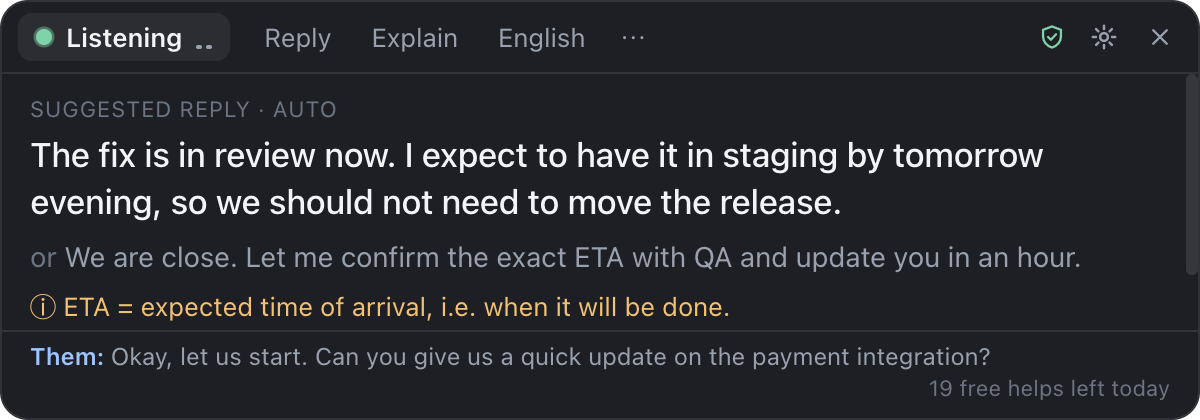
What you see: the suggestion sits right under your webcam.
Like a sharp colleague whispering in your ear.
For client calls, stand-ups and reviews, especially when the meeting is not in your first language or your mind goes blank under pressure.
Know what to say, the moment they ask
When someone asks you something, Undertone suggests a short, natural reply in a second or two, using the notes you gave it about your work.
- A best answer plus a safer, shorter option
- Never invents numbers or promises: if it does not know, it suggests an honest "let me confirm"
- Press Ctrl + Alt + Space any time for help
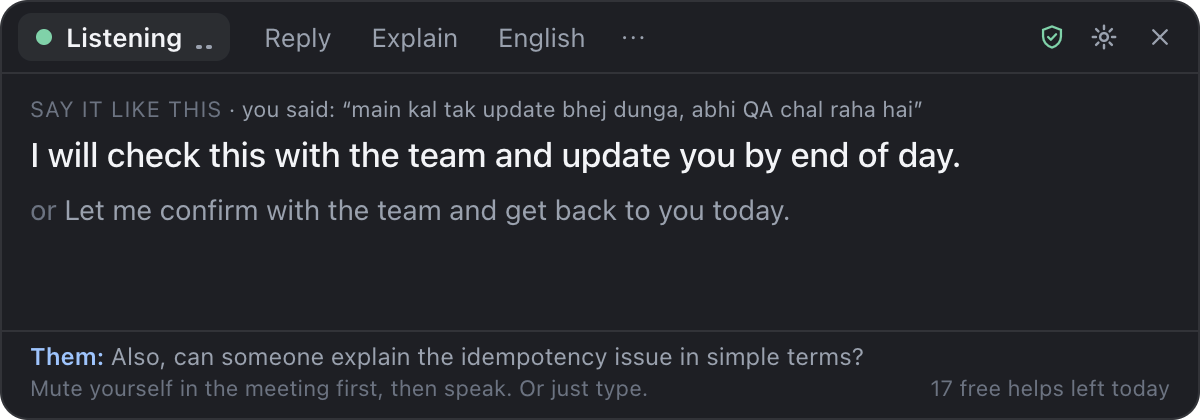
Think in your language. Speak in theirs.
Say or type what you mean in your own language (Spanish, Hindi, Arabic, Hinglish, anything), and get a polished line in the meeting's language that you can say straight away.
- Keeps your meaning and adds nothing you did not say
- Formal and casual versions
- Great for international clients and leadership calls
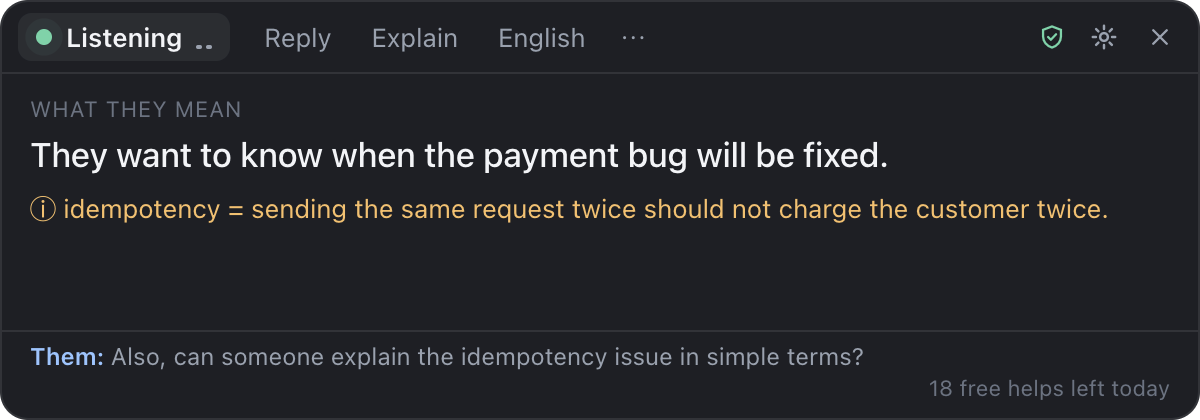
Jargon and fast talk, explained quietly
Lost the thread when someone said "idempotency", "EBITDA" or spoke really fast in a strong accent? One click shows what they meant, simply, in your own language.
- Plain-language summary of what was just said
- Acronyms and technical terms decoded
- A live transcript you can scroll back through
Hidden on screen share
On Windows 10 and 11 the panel does not appear in Zoom, Teams or Meet screen shares or recordings. Only you see it.
Right where you look
A slim panel just under your webcam, so your eyes stay near the camera and you look engaged.
Private by design
No Undertone servers, no accounts, no recordings. Your notes and transcripts stay on your computer.
Instant meeting recap
Summary, decisions and your action items at the end of the call. Copy it into your follow-up email.
Fast
Runs on Groq, one of the fastest AI services in the world. Suggestions usually appear in 1-2 seconds.
No monthly AI bill
Bring a free Groq key (2 minutes, no card). Pay once for Pro, not every month like other AI meeting tools.
Set up in two minutes.
Download & open
Install Undertone on Windows or Mac. It lives in your system tray, out of the way.
Add your free AI key
Sign in to Groq with Google, copy a free key, and paste it in. Add a few notes about your work if you like.
Press Start in your meeting
Undertone listens and helps when someone asks you something. Press Ctrl + Alt + Space any time.
Pay once. Use it forever.
Other AI meeting assistants cost $20 or more every month. Undertone Pro is a one-time payment.
Free
Try it in real meetings, for as long as you like.
- 20 AI helps every day
- Suggested replies, explanations, translation
- Unlimited live transcript
- Hidden on screen share
- Unlimited help
Pro
≈ $12 / €11. No subscription. Free updates.
- Unlimited AI help in every meeting
- Meeting recaps & action items
- Use on up to 3 computers (Windows & Mac)
- All future updates included
- 7-day money-back guarantee
Secure checkout by Gumroad. Your license key arrives by email instantly.
Questions
Do I need to pay for the AI?
No. Undertone uses your own free Groq API key. Groq's free plan is generous enough for daily meetings. You sign in with Google and create a key in about two minutes, with no card required. If you ever hit the free per-minute limit, just wait a few seconds.
Will other people in the meeting know?
No bot joins your call, and nothing is announced. On Windows 10 (version 2004 or newer) and Windows 11, the panel is excluded from screen sharing, screenshots and recordings. On Mac it is hidden from most apps, but some newer macOS screen recorders can still capture it, so check once with a test call. We do recommend being open about using AI notes where your company expects it.
Does it work with Zoom, Google Meet and Teams?
Yes. Undertone does not plug into the meeting app; it listens to your computer's audio, so it works with Zoom, Google Meet, Microsoft Teams, Webex, Slack huddles, WhatsApp calls, or any other app. On Windows it hears the other people directly. On Mac, hearing them directly needs macOS 14.2 or newer; on older Macs it uses the microphone (room mode).
Is my meeting recorded or stored?
No. Undertone has no servers. Short pieces of audio are sent to Groq with your own key to be turned into text, and the text stays on your computer. Nothing is saved unless you choose "Save transcript". See our privacy policy.
Which languages does it support?
More than 40, including English, Spanish, French, German, Portuguese, Italian, Dutch, Polish, Turkish, Russian, Arabic, Hebrew, Hindi, Hinglish, Urdu, Bengali, Tamil, Chinese, Japanese, Korean, Vietnamese, Indonesian and Swahili. It detects the meeting language automatically and handles accents and mixed languages. Replies come in the meeting's language (or one you choose), and explanations come in your own language.
What computers does it run on?
Windows 10 and 11 (64-bit), and macOS 12 or newer (Intel and Apple Silicon). An internet connection is needed during meetings.
What can't I use it for?
Undertone is a meeting helper. Do not use it in exams, tests, job interviews or any assessment where outside help is not allowed, and follow your company's rules and local laws about recording or transcribing calls. See the terms.
What if it is not for me?
Start with the free plan; there is no time limit. If you buy Pro and it does not work for you, email us within 7 days for a full refund.
Walk into your next meeting prepared.
Free to download. Two minutes to set up.